AI analysis of the whole email
Sender domain, reply-to address, links, attachment types and authentication headers (SPF, DKIM) are assessed together – not just words on a blocklist.
Outlook add-in for Microsoft 365
PhishGuard checks suspicious emails right inside Outlook. One click gives your employee a clear verdict – and tells them exactly what to do next.
Built and run by BitTech IT in Denmark
Only the emails you choose – nothing is scanned automatically
Real support by phone and email
How it works
An employee receives an email that feels slightly off – an invoice, a delivery notice or a "reset your password".
The button sits in the Outlook ribbon. PhishGuard checks the sender, links, attachments and the email’s technical headers.
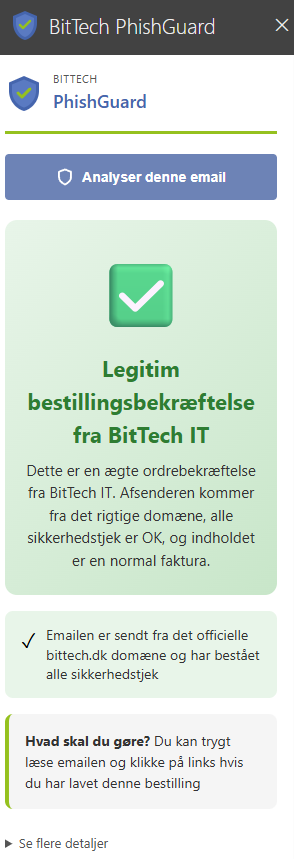
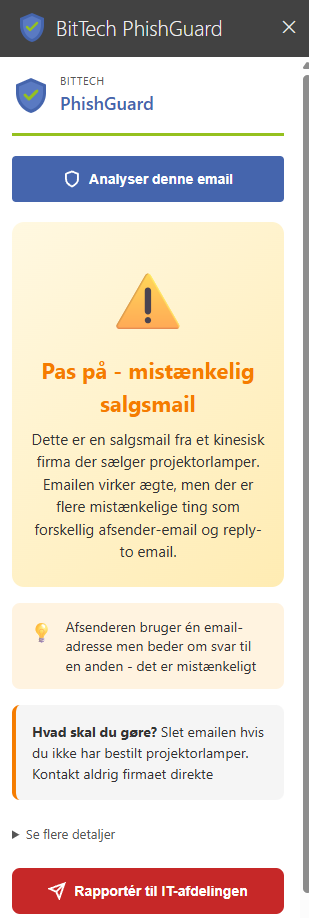
Within seconds the verdict appears in plain language – with an explanation and a concrete recommendation.
Written for employees
Your employees don’t need to know what SPF and DKIM are. PhishGuard tells them what it found, why it matters and what to do now.
Features
Sender domain, reply-to address, links, attachment types and authentication headers (SPF, DKIM) are assessed together – not just words on a blocklist.
Ordinary invoices and delivery notices from real senders are rated safe. Fewer false alarms mean warnings are taken seriously.
If an email is suspicious, the employee can report it straight from Outlook with all the details from the analysis.
Rolled out to the whole organisation from the Microsoft 365 admin center. Nothing to install on individual computers.
PhishGuard doesn’t read your inboxes. Only the emails an employee asks to check are analysed.
Developed and run by BitTech IT in Hvidovre, Denmark. Call or write, and you’ll talk to people who know the product.
Pricing
For smaller businesses
DKK 29per user per month
Most popular
When everyone should be covered
DKK 49per user per month
For larger organisations
Custom pricing
All prices exclude VAT. The trial includes Professional for 14 days. Nothing is charged automatically – we’ll contact you before the trial ends.
Frequently asked questions
Can’t find the answer? Call +45 71 99 23 19 or email support@bittech.dk.
An administrator adds PhishGuard in the Microsoft 365 admin center under Integrated apps. The button then appears in Outlook for the users you choose. Microsoft says it can take up to 24 hours before it’s visible to everyone. See the installation guide.
Outlook on the web, the new Outlook for Windows, classic Outlook for Windows and Outlook for Mac – all with Microsoft 365. The Outlook mobile app isn’t supported yet.
No. Nothing happens until an employee clicks the button on a specific email. All other emails are left untouched.
The subject, sender, recipient, text, links and technical headers are sent encrypted for analysis. Attachments are not sent – only their file name, type and size. The analysis itself is performed by the AI model Claude from Anthropic. The email text is stored encrypted so you can see the history. Read more in our privacy policy.
No. Microsoft 365 still filters out most of it. PhishGuard is for the emails that get through and leave the employee in doubt.
Your API key stops working and the button shows an error. Nothing is charged. We’ll contact you before the trial ends, and if you’d like to continue, we’ll set up the subscription.
14 days free with every feature. No commitment, no credit card.